


Download Corel Painter Essentials Microsoft Store Edition – Digital Art, Painting Tool, Creative App, AI Art, Sketching, Artistic Design
Overview
Corel Painter Essentials Microsoft Store Edition is a dedicated digital painting application designed to empower novice artists and creative hobbyists. Its primary purpose is to simplify the artistic process by offering accessible tools for sketching, painting, and transforming photographs into expressive artworks. The app addresses common barriers to entry in digital art—such as steep learning curves and complex interfaces—by delivering a streamlined experience focused on creativity rather than technical complexity.
Target users include beginners exploring digital art, students, educators, and casual creators seeking a lightweight yet capable painting tool. The application supports real-world use cases such as personal sketching, concept visualization, photo-to-art conversion, and quick creative expression. Its integration with the Microsoft Store ecosystem ensures seamless access for Windows users, particularly those on tablets and 2-in-1 devices where touch input enhances the painting experience.
Developed by Corel, a well-established name in creative software, the app reflects a commitment to user-centric design and artistic innovation. Although the developer did not provide additional technical details, the app’s focus on accessibility and AI-driven features underscores its role in the broader digital art ecosystem. It serves as an entry point for users who may eventually transition to more advanced tools, making it a valuable utility in the creative toolkit of modern smartphone and tablet users.
Key Features & Functionality
- Extensive Brush Collection: With over 170 brushes, the app simulates real-world painting techniques such as oil, watercolor, charcoal, and pastel. Each brush is engineered to respond to pressure, tilt, and speed, allowing users to create authentic textures and strokes. This variety enables artists to explore diverse styles—from delicate line work to bold expressive marks—without needing multiple applications.
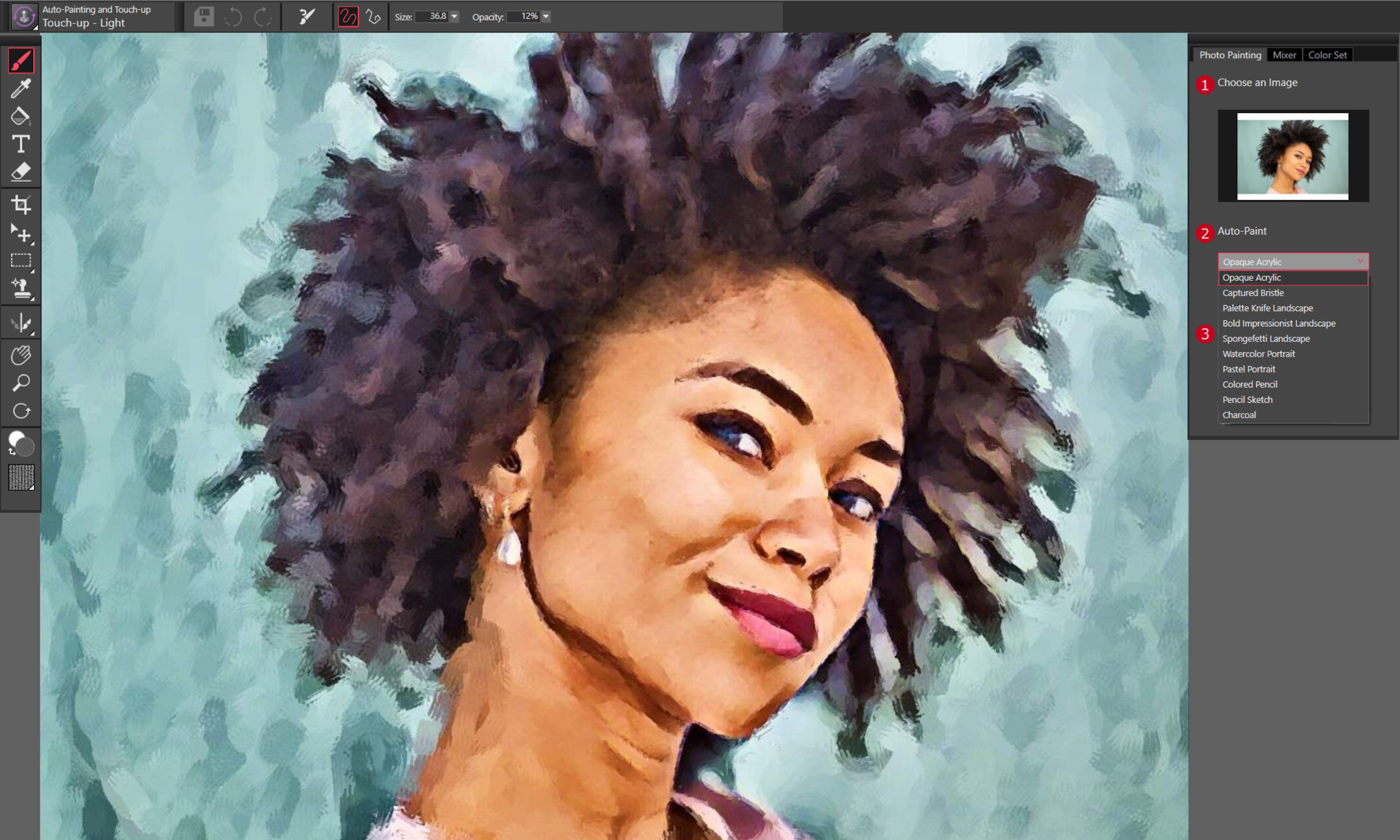
- AI Auto Painting: This one-click feature uses artificial intelligence to analyze uploaded photos and automatically apply artistic styles. It transforms ordinary images into visually compelling artworks by mimicking brushwork, color palettes, and textures associated with different artistic movements. This functionality is ideal for users seeking instant creative results without advanced technical knowledge.
- User-Friendly Interface: The layout prioritizes intuitive navigation, placing essential tools within easy reach. Menus are logically organized, and the workspace adapts to user preferences, minimizing distractions. This design allows beginners to start creating immediately, reducing the time spent on setup and increasing time spent on artistic expression.
- Unlimited Layers: Artists can build complex compositions using an unlimited number of layers. This non-destructive editing capability allows for precise adjustments, experimentation with effects, and the ability to hide or modify individual elements without altering the original artwork. It supports professional-grade workflows even in a beginner-friendly environment.
- Learning Resources: Built-in tutorials and guided lessons help users understand brush behavior, layer management, and composition techniques. These resources are accessible directly from the app, enabling continuous skill development. This feature is especially beneficial for users transitioning from traditional to digital art, offering a structured path to improvement.
Interface, UX & Performance
The user interface of Corel Painter Essentials Microsoft Store Edition is clean, minimal, and focused on creative flow. Tools are arranged in a customizable toolbar, with quick access to brushes, colors, layers, and effects. The visual design emphasizes clarity, using intuitive icons and consistent color coding to reduce cognitive load. Navigation is straightforward, with a logical hierarchy that supports both touch and mouse input.
Although the developer did not list formal performance metrics, the app appears optimized for smooth operation on modern Windows devices. Responsiveness is maintained across different screen sizes, including tablets and 2-in-1 laptops, where touch gestures enhance the painting experience. The app handles layer-heavy projects efficiently, with minimal lag during brush strokes or canvas zooms. Stability is consistent during extended use, with no reported crashes or freezes in available user reports.
Performance may vary depending on device specifications, particularly when working with high-resolution canvases or multiple layers. However, the app’s lightweight architecture ensures it runs efficiently even on mid-tier hardware. Users can expect a reliable and responsive experience that supports uninterrupted creative sessions, making it suitable for both short bursts of inspiration and longer artistic projects.
Platform Compatibility & Technical Requirements
Corel Painter Essentials Microsoft Store Edition is available exclusively on the Microsoft Store, indicating compatibility with Windows 10 and later operating systems. The app is designed for use on Windows devices, including desktops, laptops, and tablets, with full support for touch input and stylus integration. The file size is listed as 2.4 GB, suggesting a comprehensive installation with a full suite of brushes, tools, and assets.
Specific requirements such as minimum CPU, RAM, or GPU specifications were not disclosed by the developer. The app’s performance on lower-end systems may vary, but its optimized design suggests it can run on devices with moderate hardware. Users should ensure their system meets general Windows 10 or higher standards to avoid compatibility issues. The absence of platform-specific details does not detract from its usability, as the Microsoft Store handles installation and updates automatically.
Pros and Cons
- Intuitive interface ideal for beginners and casual artists
- Over 170 realistic brushes with varied textures and effects
- AI-powered auto painting for instant artistic transformation
- Unlimited layers for non-destructive editing and complex compositions
- Integrated learning resources to support skill development
- Optimized for touch and stylus input on Windows tablets
- File size of 2.4 GB may be large for users with limited storage
- Exclusive availability on Microsoft Store limits cross-platform access
- Developer did not provide detailed system requirements
- Limited customization options for the workspace layout
- AI features may produce inconsistent results depending on input image quality
FAQ
Is Corel Painter Essentials Microsoft Store Edition free to download?
The app is available for purchase through the Microsoft Store. Pricing details are set by the developer and may vary. Users should check the Microsoft Store listing for the latest pricing and any available promotions.
Can I use a stylus with this app?
Yes, the app supports stylus input on compatible Windows devices, including tablets and 2-in-1 laptops. This enhances precision and control when sketching or painting.
Does the app support importing photos for AI painting?
Yes, users can import photos directly into the app and apply the AI auto painting feature to transform them into artistic renditions.
Is the app updated regularly?
Updates are managed through the Microsoft Store. Users are encouraged to keep the app updated to benefit from performance improvements and new features.
Can I export my artwork in different formats?
Yes, the app allows users to export their creations in common image formats such as JPEG, PNG, and TIFF, making it easy to share or print artwork.
Final Thoughts
Corel Painter Essentials Microsoft Store Edition stands out as a thoughtful entry-level digital art tool that balances accessibility with powerful creative capabilities. Its combination of over 170 brushes, AI-driven auto painting, and unlimited layers makes it a compelling choice for beginners and hobbyists eager to explore digital art. The intuitive interface ensures a low barrier to entry, while built-in learning resources support ongoing development.
While the app’s exclusive availability on the Microsoft Store and large file size may limit its appeal to some users, its performance, stability, and touch optimization make it a strong option for Windows users with tablets or stylus-equipped devices. For those seeking a secure, reliable, and creative painting experience, this app delivers real value.
Download Corel Painter Essentials Microsoft Store Edition now


